Mac OS X Lion Terminal Theme: Peppermint
Development 29/09/2011

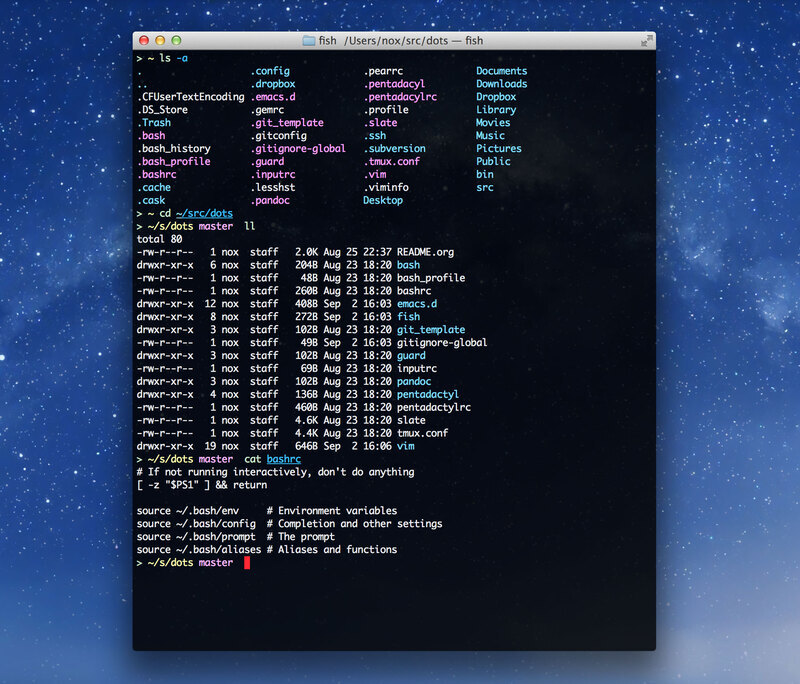
I do a lot of work in Mac OS X’s Terminal.app, and I’ve spent some time tweaking the colors, font, and other settings to get it just right. The result is Peppermint, a Terminal theme for Lion:
- #000000
- #E6E6E6
- #FF0028
- #4C4C4C
- #FF6685
- #A6EBA6
- #FFDC72
- #5DC6F5
- #FF8FFF
- #86D1D7
- #DBDBDB
- #737373
- #FFA8BA
- #C5EBC5
- #F9F9A5
- #8DDBFF
- #FFABFF
- #B0F0F0
- #FFFFFF
The background, text, and bold text colors respectively on the top row; normal and bright colors below.
The text colors were chosen for maximum legibility on the dark background. The soft white text is accented with the red-pink bold text style.

Peppermint on the desktop
Feel free to download the .terminal file and enjoy.
Version 1.1
- Increased background opacity for better legibility when window is on a light backdrop
- Removed background blur
- Very subtle adjustments to colors
Version 1.0
- Initial Release
Is this compatible with Lion? I don’t see any color highlights, all text is white.
I see you have mentioned Lion clearly… what should I do to make this work right.
Hi Shajahan,
Keep in mind that colors besides white will only show up when output is colored in the first place. For example, the Bash prompt in the screen above is styled with bold text, which I set in my
.bashrcfile:Likewise, colored output from various utilities including
lscan be turned on withA little Googling will find you more information about enabling and using colors at the command line.
Hope that helps.
god, oh god yes.
Beautiful! Now only if it supported iTerm.